







Sneakers & Shoes

The Right Way to Wear Loafers with Socks

Share via

Our team of editors and experts thoughtfully chooses each product. If you decide to buy through one of our links, we may earn a commission. Learn more. Want to know how we test products? Click here for more details.

Loafers have always been a timeless staple in men’s wardrobes, offering the perfect mix of casual style and refined elegance. But when it comes to pairing them with socks, the debate has persisted for years—should you go bold, keep it classic, or skip the socks altogether? The answer isn’t as straightforward as black and white, because the right choice can completely change the vibe of your outfit.

The truth is, there’s no single “right” way to do it. Worn with confidence, loafers and socks can elevate your style, whether you’re aiming for laid-back charm or tailored sophistication. It’s about choosing the right textures, colours, and occasions to let the pairing shine—because when done correctly, this classic duo doesn’t just finish an outfit, it makes a statement.
When To Wear Socks With Your Loafers?

When it comes to loafers, the sock debate always sparks conversation. The truth is, it’s not a one-size-fits-all rule — it depends heavily on the setting, the season, and the overall vibe you’re aiming to convey. Loafers are versatile by nature, allowing you to switch from a polished boardroom look to a casual weekend style without missing a beat, but socks (or the absence of them) play a significant role in that transition.

For more formal occasions, socks are definitely the way to go. Think business meetings, weddings, or upscale dinners where a sharp, intentional look is required. Pairing loafers with carefully chosen socks adds sophistication and shows you’ve paid attention to every detail. Neutral shades like black, navy, or grey keep things timeless, while patterned or coloured socks can introduce a fun touch if the dress code permits. The main point is balance — socks should complement your outfit, not clash with it.

On the other hand, loafers worn without socks work well in casual or warm-weather settings. A summer garden party, a weekend walk, or even a beachside dinner calls for a more relaxed vibe. Going sockless showcases that effortless European charm, allowing the shoes to stand out while keeping the outfit light and breathable. If comfort matters, discreet no-show socks are a stylish shortcut — you get the clean sockless look without compromising comfort or hygiene.
What Are The Best Trousers To Pair With Loafers?

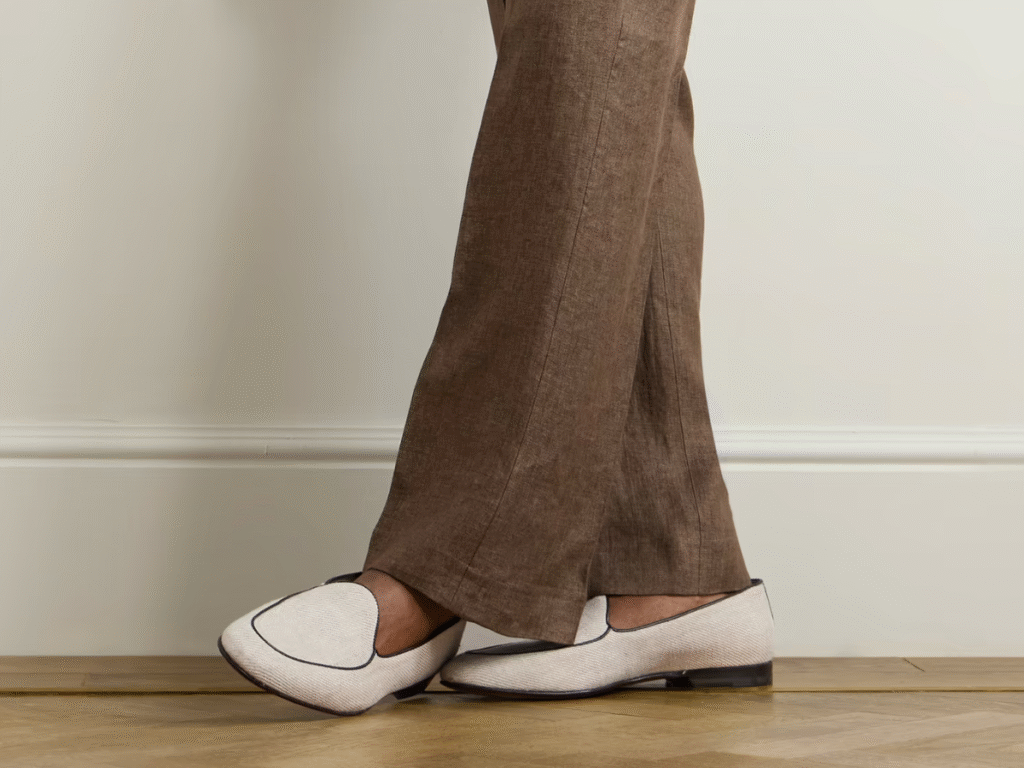
When styling loafers, your choice of pants can make or break the look. Slim, tailored options are often the safest choice, as they strike the perfect balance between polished and relaxed. Think chinos that end just above the ankle, giving your loafers space to stand out without overwhelming the overall silhouette. If you prefer a dressier vibe, flat-front suit trousers in wool or linen elevate the outfit, making it suitable for the office, weddings, or evenings out. The key is keeping the hem neat—too much break, and you risk hiding the loafers’ sharp lines.

On a more casual note, loafers also pair effortlessly with cropped trousers and well-fitted denim. Dark wash jeans rolled at the cuff bring a smart yet laid-back vibe, while pleated trousers add a touch of vintage charm that feels timeless. Avoid overly baggy or long trousers that pool at the ankle—they can drown out the elegance of loafers. Instead, opt for cuts that frame the shoe, highlighting both the structure of the loafer and the flow of the outfit. When done right, the trousers become the canvas and the loafers the finishing touch.

  • Chinos: A classic pairing that always works. Choose slim or tapered chinos that finish just above the ankle—ideal for a clean, polished look with a relaxed vibe.
  • Tailored Suit Trousers: Ideal for dressier occasions. Wool or linen suit trousers with a sharp cut allow your loafers to shine in formal or business settings. Keep the hem neat with little to no break for maximum impact.
  • Cropped Trousers: These give off a modern, fashion-forward vibe. Cropped cuts naturally highlight your loafers and look especially sharp when paired with no-show socks.
  • Pleated Trousers: Great for adding a vintage flair. The structured drape pairs beautifully with penny or tassel loafers, giving your outfit a timeless touch.
  • Denim: Yes, jeans can work too—just make sure they’re slim or straight cut. A dark wash with a slight cuff strikes a good balance between casual and polished when paired with loafers sophistication.

The golden rule? Avoid trousers that are too baggy or long. Loafers look their best when the trousers frame them, not when they’re lost under excess fabric. Keep the lines clean, and your loafers will always stand out as the star of the fit.
What Socks to Wear with Your Loafers?

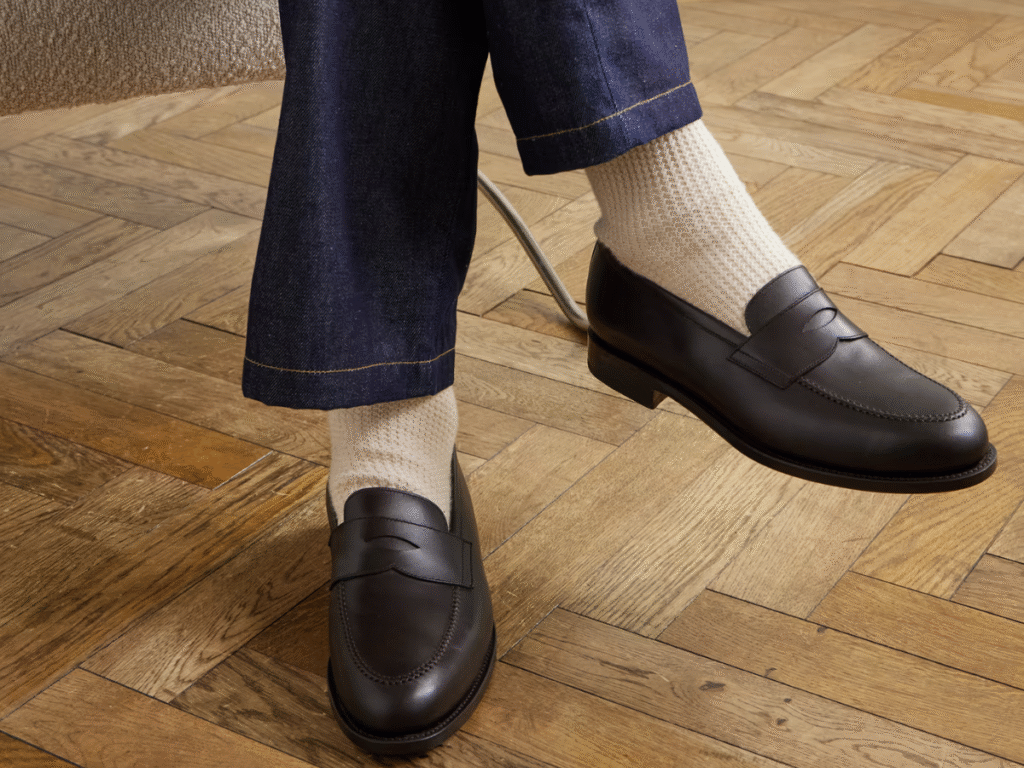
The beauty of loafers lies in their versatility—you can pull them off with or without socks, but the choice you make can completely change the mood of your outfit. Picking the wrong pair can throw the whole look off, while the right socks can make everything feel sharp, intentional, and stylish.

Leather loafers are an essential part of a man’s wardrobe. While it’s customary to wear them with discreet socks, you can also stand out by opting for original, colourful, or graphic-printed pairs. In fine wool or cotton, high or mid-calf, these socks not only keep your legs and feet warm through winter but also give you room to play with style. Fancy, patterned, or plain, the key is choosing socks with reinforced heels and toes—they’ll fit better, last longer, and keep your loafers looking their best. And when it comes to colour, certain combinations with loafers just hit differently, elevating your whole look in a matter of seconds.

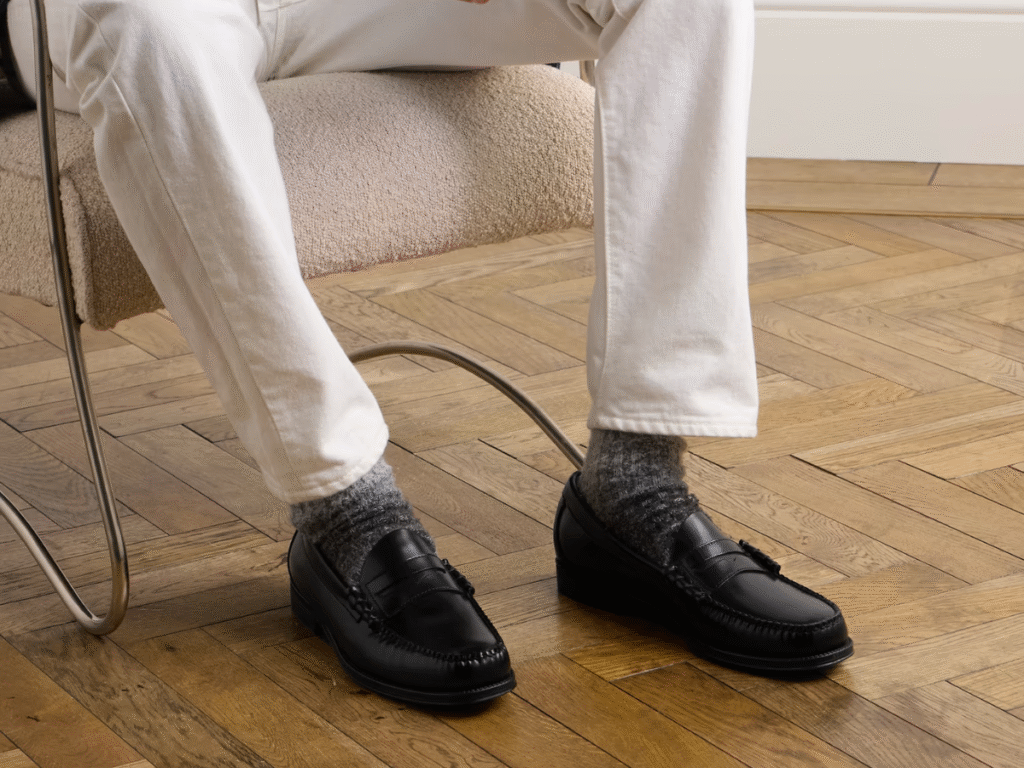
For a sleek, modern vibe, no-show socks are a must. They give you that effortless bare-ankle look without sacrificing comfort or hygiene, making them perfect for summer days or casual outings. On the flip side, thin dress socks are the smarter pick for formal occasions. Stick with classic shades like navy, grey, or black, or match your socks to your trousers for a clean, uninterrupted line.

If you’re in the mood to add personality, patterned socks are a subtle way to do it. Think stripes, polka dots, or geometric prints that add flair without stealing the show. For colder months, textured or ribbed socks work beautifully with heavier fabrics like wool trousers, keeping your outfit season-appropriate. And of course, bold statement socks are always an option—bright colours or standout designs can turn your loafers into a canvas for self-expression.

At the end of the day, it’s all about balance. Your socks should either blend seamlessly into the outfit or deliberately stand out as the statement piece. Anything in between tends to feel unplanned—and loafers are far too sharp a shoe to pair with an afterthought.
What Socks To Wear With Coloured Loafers?

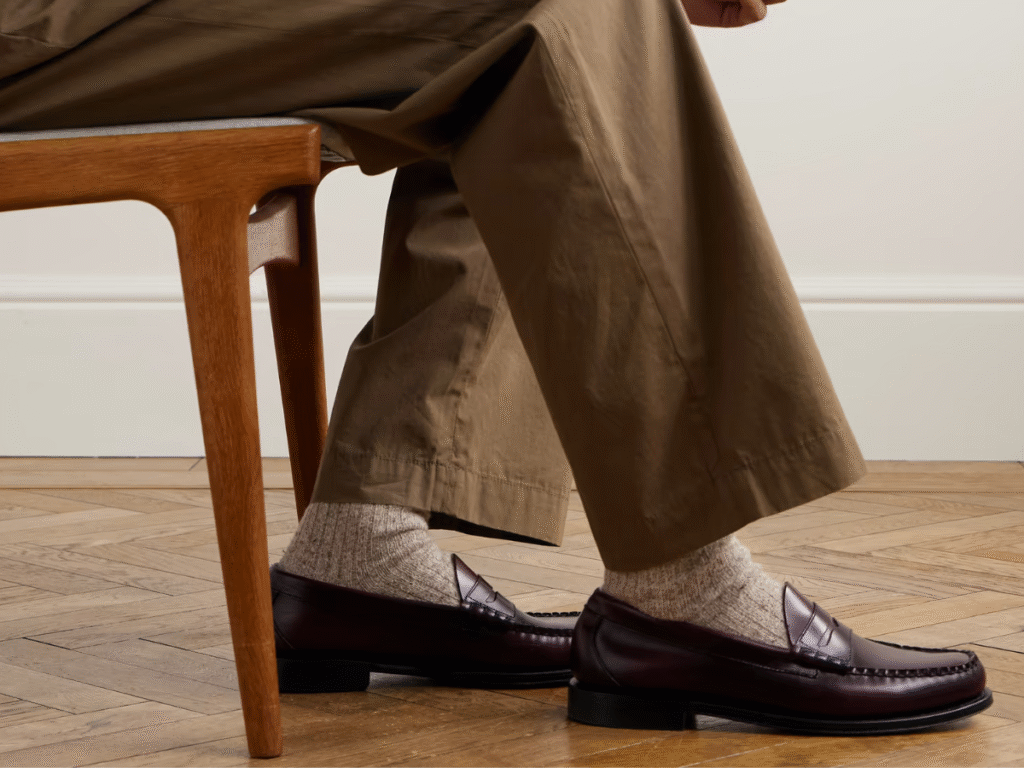
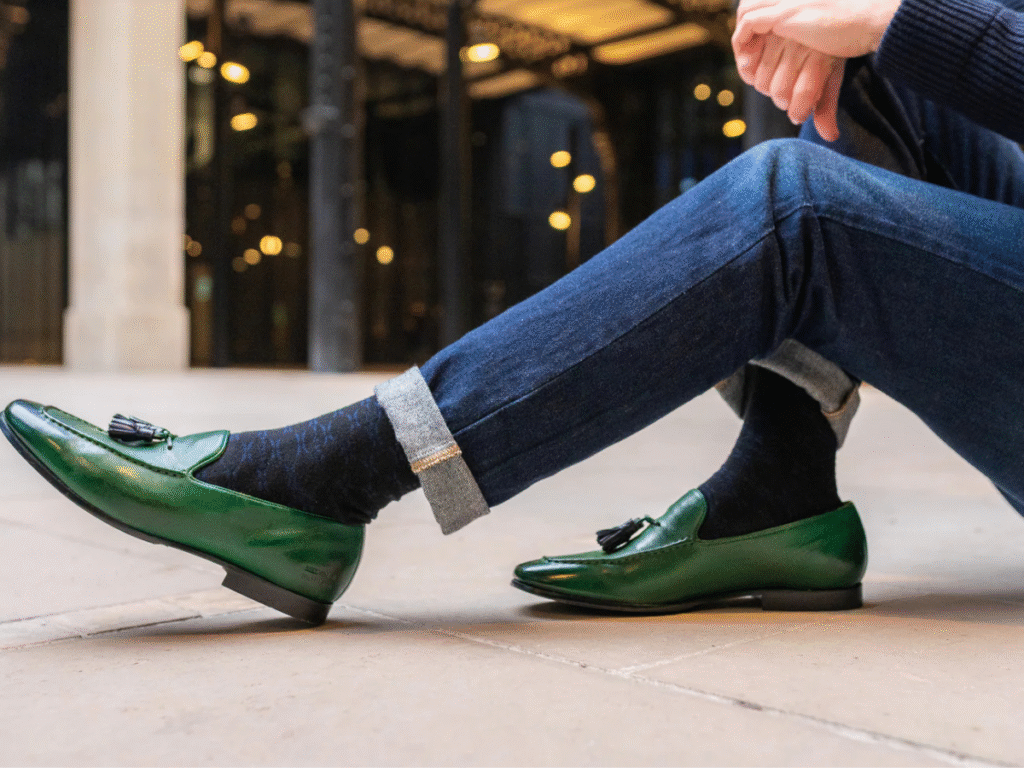
Coloured loafers already make a statement, so the socks you choose should find the right balance. For deep tones like burgundy, navy, or forest green, neutral socks—grey, beige, or black—help anchor the look and keep the focus on the shoes. This works particularly well for dressier occasions or when you want a polished finish without overcomplicating things.

If you’re feeling bold, coloured loafers also allow you to experiment. Mustard socks with navy loafers or dark green socks with brown shades can add personality, while subtle patterns like stripes or geometric prints bring extra character. For brighter loafers, such as pastels or reds, keep socks understated in light neutrals or even go sockless to let the shoes stand out. The key is harmony—your socks should complement, not compete with, your loafers.

What Socks To Wear With Dark Loafers?

Dark loafers — whether black, espresso brown, or deep navy — are the most versatile of the bunch, and your sock choice can completely change the mood. For formal or business looks, go for classic pairings: black socks with black loafers, charcoal with navy, or deep brown with dark brown. These subtle, tone-on-tone combinations create a sleek, elongated silhouette that works perfectly with suits and dress trousers.

If you want to add personality without sacrificing sophistication, patterned or textured socks are your best choice. Consider burgundy houndstooth with black loafers, or navy pinstripes with dark brown. For a smart-casual touch, dark loafers also look great with earth-toned socks—olive, rust, or maroon—that add depth without clashing. The general rule? Keep the base dark and let patterns or accents stand out.

General FAQ’s

Should Loafers Always Be Worn With Socks?

Not necessarily. Loafers are among the few shoe styles that offer versatile options. In warm weather or at casual gatherings, you can wear them sockless for a relaxed, breezy look. However, when heading to the office, attending a formal dinner, or dressing for cooler weather, wearing socks not only enhances your appearance but also provides added comfort.

Can You Wear Patterned Socks With Loafers?

Absolutely. Patterned or colourful socks can add personality and flair, especially with neutral loafers. The key is balance—if your outfit is already bold, stick to subtle sock designs. If your outfit is simple, socks can be your statement piece.

What Type of Socks Should I Avoid With Loafers?

\Bulky athletic socks are a big no. They disrupt the slim profile of loafers and clash with the shoe’s refined aesthetic. Instead, stick to thin dress socks or fine cotton and wool blends that fit snugly and complement the loafer’s sleek silhouette. It’s also wise to skip overly flashy novelty socks (unless that’s your personal style) since they can distract from the timeless charm of the loafer itself.


Loafers & Slides
About the Author
Previous Post
$26 Million Ferrari Daytona SP3 ‘Tailor Made’ Becomes Ferrari’s Most Expensive New Car Sold at Auction
Next Post
10 Highest-Paid Players in the English Premier League This Season

Related Articles

7 Best Nintendo Switch Docks You Can Buy Right Now

Reading Time: 10 minutes

Our team of editors and experts carefully selects each product. If you choose to purchase through one of our links, we may earn a commission. Learn more. Do you want to know how we test products? Click here for more details.

When it comes to gaming on the go — or docking for a full-screen living room experience — the Nintendo Switch is in a league of its own. Celebrated by many as the best console, players naturally seek the best accessories to match. Whether you’re aiming for higher performance, more ports, or something more travel-friendly, the right dock can completely enhance your gaming experience.

While the standard dock is functional, third-party options have greatly improved. Some are sleeker, some offer better cooling, and others include extra features that Nintendo’s original dock doesn’t even try to provide. From reliable home setups to portable powerhouses, we’ve compiled the 7 best Nintendo Switch docks that are worth every penny.

Quick Picks: Best Nintendo Switch Docks Overview

Nintendo Switch Deck | Image: Supplied

1. Nintendo Switch Dock

  • Compatibility: Nintendo Switch, Nintendo Switch OLED
  • Ports: 2 x USB, HDMI, LAN
  • Power Supply: No
  • Weight: 315g
  • Price: USD $109.99

Sticking with the official Nintendo Switch Dock is always a smart choice. It’s a popular option for many, especially since it comes bundled with the Switch OLED model. This dock features a clean and simple design, with two USB ports on the side, one at the back, and an HDMI output that makes switching to TV mode easy. There’s also a wired LAN port, which is beneficial for stable online gameplay. While it doesn’t include all the features of some third-party options, it’s reliable, proven, and officially supported — just remember, it’s only compatible with the Nintendo Switch and OLED models. The updated version of the dock is set to launch in the United States on June 5th, making it a great time to upgrade if you’re sticking with the official accessory.

Ukor Switch Deck | Image: Supplied

2. Ukor Switch Dock

  • Compatibility: Nintendo Switch, Nintendo Switch OLED
  • Ports: 3x USB, HDMI, USB-C Charging,
  • Power supply: No
  • Weight: 100g
  • Price: USD $27.99

If you’re always on the move and need something much smaller than the official dock, this compact third-party option is ideal. Designed as a lightweight, travel-ready alternative, this mini Switch dock supports TV mode, USB-C charging, and HDMI output, all within a pocket-sized design. It’s a great choice for weekend trips, gaming at a friend’s place, or simply reducing cable clutter at home. While it doesn’t include an AC adapter and works best with Nintendo’s official charger, it excels in portability. Plus, it’s more budget-friendly, making it a smart option if you’re looking for a backup dock or prefer a minimal setup while on the go.

Ikedon Switch Dock | Image: Supplied

3. Ikedon Switch Dock

  • Compatibility: Nintendo Switch, Nintendo Switch OLED
  • Ports: 1 x USB 3.0, 2 x USB 2.0, USB-C, HDMI
  • Power Supply: No
  • Weight: 48g
  • Price: USD $29.99 ​

If portability and price are your top priorities, the Ikedon Switch Dock effortlessly ticks both boxes. It’s very lightweight, travel-friendly, and features a more open cradle-style design that reduces the risk of scratching your screen — a common concern with the official dock. The adjustable angle is a nice bonus, especially if you’re playing in tabletop mode and want a better view. However, there are a few things to consider. You’ll need to bring your own power adapter (preferably the official one), and while the dock supports 4K output, the Switch itself maxes out at 1080p — so don’t expect a resolution boost. The build quality feels reasonable for the price, but it’s not exactly a premium choice for travel or a secondary setup.

KDD Docking Station Add-On | Image: Supplied

4. KDD Docking Station Add-On

  • Compatibility: Nintendo Switch, Nintendo Switch OLED
  • Ports: 4 x USB
  • Power Supply: Yes
  • Weight: 115g
  • Price: USD $15.99

If you want to keep your gaming setup organised and your Joy-Cons charged, the KDD Docking Station Add-On is an effective solution. Designed to attach seamlessly to your existing Switch dock, it allows you to charge up to four Joy-Con controllers at the same time. Additionally, it features eight game card slots, helping you keep your favourite titles within easy reach and your gaming area tidy. The dock includes LED indicators that show the charging status of each Joy-Con, while built-in safety features protect against overcharging, overheating, and short circuits. Its compact design ensures it doesn’t take up much space, making it a convenient addition to your gaming station.

Gulikit Switch Dock Station | Image: Supplied

5. Gulikit Switch Docking Station

  • Compatibility: Nintendo Switch, Nintendo Switch OLED
  • Ports: USB, HDMI
  • Power Supply: No
  • Weight: 108g
  • Price: USD $29.99

If you’re seeking a compact and versatile docking option, the GuliKit Switch Docking Station offers a sleek alternative to the official dock. Its minimalist design includes a magnetic cover for the USB-C connector, providing protection during transport. The dock supports 4K, 1080P, and 720P video output, although the Switch itself caps at 1080P.

The GuliKit dock’s air vents help keep it cool during long play sessions. It has a stylish, portable design, but it only has one USB-A port, which limits connectivity. The dock mode button can be stiff, needing a firm press. Despite these drawbacks, it remains a solid, travel-friendly choice for gamers at its price.

SIWIQU Switch Dock | Image: Supplied

6. SIWIQU Switch Docking Station

  • Compatibility: Nintendo Switch, Nintendo Switch OLED
  • Ports: 2 x USB-A (USB 2.0), 1 x USB-C Input, 1 x USB-C Output, HDMI
  • Power Supply: No
  • Weight: 100g
  • Price: USD $27.99

If you’re looking for a portable and budget-friendly alternative to the official Nintendo Switch dock, the SIWIQU Docking Station presents an appealing option. Its compact design makes it perfect for travel or small spaces. The dock features a one-touch display switching button that effortlessly switches between TV and tabletop modes.

The SIWIQU Docking Station supports 4K, 1080P, and 720P video output, but the Switch maxes at 1080P. It has two USB-A ports for peripherals. Using the official Nintendo Switch AC adapter is essential for best performance and avoiding issues. Its lightweight, portable design makes it ideal for gamers.

MOSAHOLL Switch Dock Station | Image: Supplied

7. MOSAHOLL Switch Dock Station

  • ompatibility: Nintendo Switch, Nintendo Switch OLED
  • Ports: 1 x USB-C , 1 x USB-A 3.0, HDMI
  • Power Supply: No
  • Weight: 100g
  • Price: USD $45.99 ​

For a portable and space-saving alternative to the official Nintendo Switch dock, consider the MOSAHOLL Switch Dock Station. Its lightweight design makes it ideal for gaming on the move, and it offers 4K video output for crisp visuals on compatible screens. Additionally, the USB-A 3.0 port enables the connection of peripherals like controllers or external storage devices. While the MOSAHOLL dock features impressive capabilities for its price, it is crucial to use the official Nintendo Switch AC adapter to ensure optimal performance and avoid potential problems. Some users have experienced occasional connectivity issues, so it’s best to handle the dock carefully and ensure all connections are secure.

Nintendo Switch Dock Buying Guide

If you’re looking for a Nintendo Switch dock, whether it’s your first or a spare for travel, there are a few key points to consider. Compatibility is essential — not every dock works with all versions of the console, and if you’re using a Switch Lite, you’ll need to ignore video output features entirely. You should also think about the number and type of ports, especially if you plan to connect peripherals or need a more stable internet connection. The power source is important as well — third-party docks can be excellent, but make sure you’re using the correct adapter. Whether you prefer a full-sized dock for your home setup or an ultra-portable one for your gaming bag, the right dock should suit your lifestyle, console, and budget.

Third-Party Docks

Third-party Nintendo Switch docks have become popular alternatives to the official model. They often showcase smaller, more portable designs and include various enhancements, such as extra USB ports and better ventilation. Many users prefer these docks for travel or as secondary setups, especially when looking for a more affordable option. However, it’s essential to check compatibility and reviews before purchasing, as not all third-party docks offer the same level of reliability or safety. Using a trusted power adapter — ideally the official Nintendo one — is generally advised to prevent performance issues or potential damage. With proper research, a third-party dock can be a useful and convenient addition to your gaming setup.

Connectivity

As mentioned, a good dock should cover the essentials, such as HDMI output for TV viewing, USB ports for charging accessories or wired controllers, and Ethernet (LAN) for a more stable online connection. If you don’t need all the features, keep it simple — just make sure the ports match your setup and how you play.

Price

When choosing a dock, price usually reflects design, build quality, and extra features. Basic models tend to focus on core functionality, while more expensive options often include additional ports, compact designs, or higher-quality materials. It’s not always about spending more — it’s about finding the dock that fits your needs. Consider how often you’ll use it, whether you need it for travel or home, and what types of accessories you’ll connect. Prioritize reliability and compatibility over flashy extras, and you’ll achieve better value in the long run.

General FAQ’s

Do All Docks Work With The Switch OLED Model?

Most newer docks do, but it’s wise to verify compatibility, particularly with third-party options. Not all of them are designed considering the OLED’s slightly larger dimensions.

Are Third-Party Switch Docks Safe To Use?

They can be, provided you select a reputable brand and use the official Nintendo power adapter. Be sure to review ratings and product compatibility to minimize risks.

Can I Use My Switch Lite With A Dock?

No — the Switch Lite doesn’t support video output, so it won’t work with any dock for TV play. It’s designed for handheld use only.

About the Author

Related Articles

arrow_drop_up