





Google Earth Flight Simulator
TechnologyTravel

Google Earth’s Flight Simulator Lets You Fly Around the World From Your Browser

Reading Time: 6 minutes

Share via

Our team of editors and experts thoughtfully chooses each product. If you decide to buy through one of our links, we may earn a commission. Learn more. Want to know how we test products? Click here for more details.

  • Google Earth’s experimental Flight Simulator is now available globally through the web, with no desktop application required.
  • Users can fly over almost anywhere on the planet using keyboard or mouse controls, with simplified physics designed for casual exploration.
  • Switching from Map to Satellite view adds high-resolution imagery, terrain and dynamically loaded 3D buildings.
  • Faster flying or a low-bandwidth connection may cause loading delays, while some low-altitude areas can experience visual clipping.
  • Crashing pauses the simulator and provides an instant restart, returning the aircraft to a safe altitude without any paperwork from air traffic control.

If you have ever opened Google Earth, found your house and then immediately started exploring places you have never visited, there is now another way to lose an afternoon. Google has brought its experimental flight simulator to the Google Earth Browser Version, allowing anyone with a computer and a web connection to fly around the planet without downloading the desktop app.

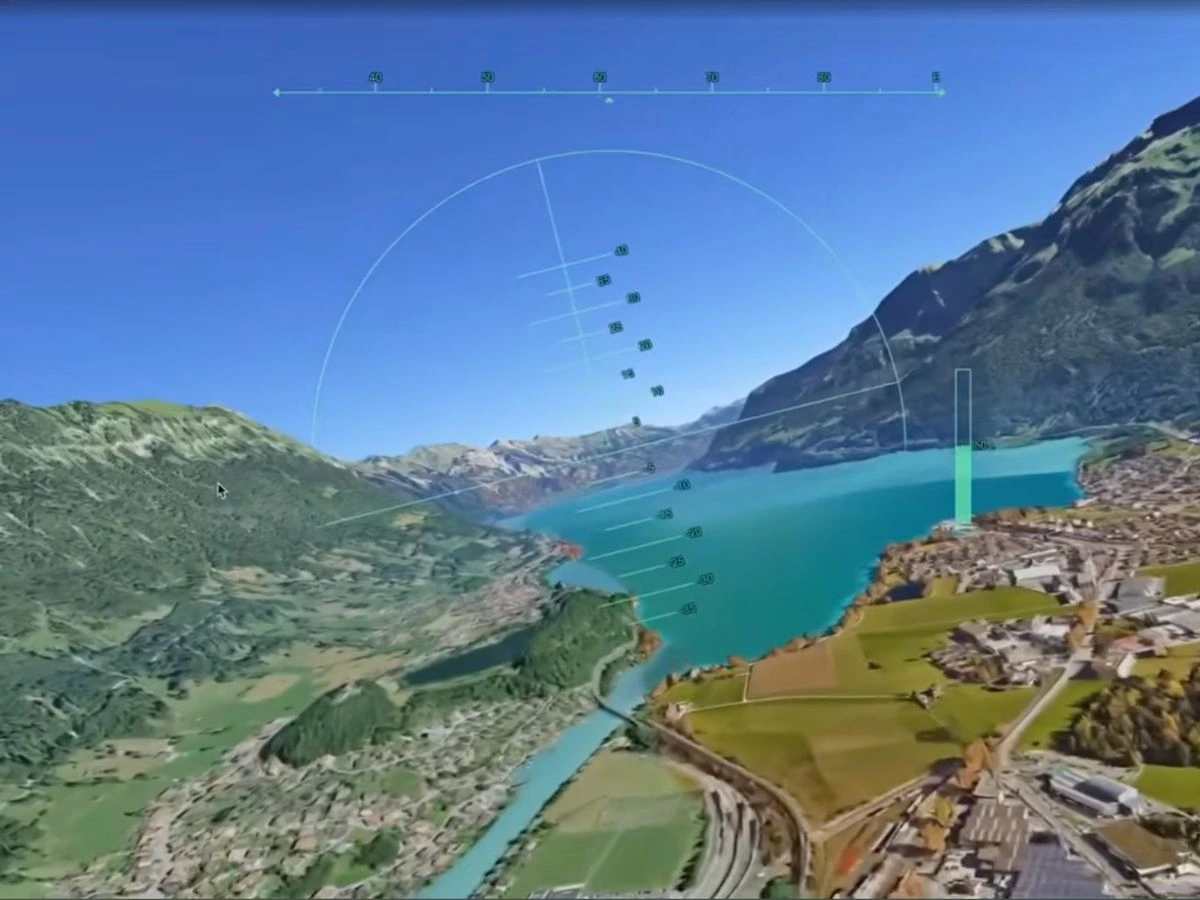
For readers who love planes, airlines or simply seeing familiar cities from a completely different angle, the feature offers a wonderfully low-commitment way to take to the virtual skies. You can skim above city skylines, follow coastlines or attempt to thread your aircraft through mountain valleys using Google Earth’s streaming 3D buildings and satellite imagery.

Just do not expect Microsoft Flight Simulator-level realism.

Google describes the experience as a casual exploration tool with simplified flight physics, so there are no detailed cockpits, airline schedules or hours of training required before take-off. All you need is a browser, a keyboard or mouse and a location worth flying over—although keeping the plane in the air may still take a little practice.

How to Use Google Earth’s Flight Simulator in Your Browser

Getting started is surprisingly easy. Open Google Earth on your computer and select Explore Earth from the home screen. Once the globe loads, choose the place you want to explore using the search bar, whether that is New York, the Canadian Rockies, the California coast or somewhere much closer to home. Google says the feature is now available globally on the web, giving users around the world access without paying for separate flight-simulation software.

Next, open the Tools menu along the top of the page and select Flight Simulator. Google Earth will move from its regular map interface into a simple flying experience that runs directly inside your browser, so there is no desktop application to download and no separate game installation standing between you and take-off.

Before flying, switch the basemap from Map to Satellite. Google Earth uses the abstract map by default, but Satellite view brings in the photorealistic imagery, terrain and 3D buildings that make flying over real places much more interesting. From there, your virtual travel list can include Sydney Harbour, the Grand Canyon, Tokyo, the Alps, your childhood neighbourhood or almost anywhere else you can locate on the globe.

Now comes the slightly trickier part — keeping the plane in the sky.

Use Page Up to increase thrust and Page Down to reduce it, while the arrow keys control pitch and banking. The up arrow makes the aircraft climb, the down arrow points it towards the ground, and the left and right arrows bank in their respective directions. You can also click inside the simulator to toggle mouse-based controls, although whether that improves your relationship with gravity is another matter entirely.

If you crash, the simulator pauses and gives you a Restart option, returning the aircraft to a safe altitude without making you repeat the entire setup. When you have finished flying, select the back arrow in the upper-left corner to return to the regular Google Earth map. Microsoft Flight Simulator already has detailed aircraft systems and precision aviation covered; Google’s free alternative is something you open for fun when you want to fly over places you know—or places you may never get to see in person.

What to Expect From Google Earth’s Browser Flight Simulator

Google is fairly upfront about what this flight simulator is—and what it is not. The feature uses simplified flight physics and is designed for casual exploration rather than high-fidelity aerodynamic training, so nobody is walking away from a ten-minute flyover of Manhattan ready to command an Airbus A350.

You will not find detailed airline procedures, interactive cockpit systems, an FMS to program or an ILS approach waiting at the end of a long-haul sector. Google Earth gives you a plane, a planet-sized map and just enough control to make you appreciate how much work goes into keeping a real bird straight and level.

Think of it as Google Earth with wings.

The scenery is the real attraction. As you fly, Google Earth dynamically streams 3D buildings and high-resolution imagery into the browser, meaning every trip changes depending on where you point the nose. City skylines, mountain ranges and coastlines make for the best virtual sectors, particularly after switching from the basic Map view to Satellite.

Your internet connection also becomes an unofficial member of the flight crew. Google warns that travelling at extreme speeds or flying with limited bandwidth can cause temporary loading delays as the platform attempts to render the world beneath you. You may achieve positive rate, but the city below could still be waiting for clearance to appear.

The feature remains labelled Experimental / pre-GA, so a few technical quirks are already on Google’s squawk list. Low-level flying in areas below sea level, including Badwater Basin in California, may produce flashing or terrain clipping, while standard Google Earth map shortcuts are disabled during a flight to prevent them from interfering with the aircraft controls.

The good news is that an unscheduled arrival into the terrain is not the end of your aviation career. When the aircraft hits the ground, the simulator pauses and displays a “You crashed! Restart” button, placing you back at a safe altitude and location. No Mayday call, accident report or awkward conversation with the chief pilot required.

Google Earth’s Flight Simulator is available globally through Google Earth on the web. Choose somewhere scenic, activate Satellite view and remember the first rule of casual browser aviation: keep the blue side up and the brown side down.


Google
About the Author
Technology

Here’s Everything You Missed From Apple’s iPhone 17 Showcase

Reading Time: 12 minutes

Our team of editors and experts thoughtfully chooses each product. If you decide to buy through one of our links, we may earn a commission. Learn more. Want to know how we test products? Click here for more details.

Finally, the day has come: Apple’s main event is here, and everyone has been waiting for it. After months of leaks, speculation, and last-minute “insider” rumours, the main moneymaker finally pulled the curtain back on the iphone 17 lineup. Considering how lukewarm last year’s iPhone 16 felt — a release that never really carved out its own personality — there was a lot riding on this showcase. The question was simple: would Apple actually step things up?

The answer is… yes. The iPhone is without a doubt the biggest shake-up, not because it was a surprise, but because it redefined what an iPhone can look and feel like. Still, the reveal came with hints of déjà vu, thanks to months of leaks and some jokes about whether Apple had truly banished the ghosts of that infamous bending issue. People will definitely be stress-testing this thing the moment it hits the shelves, and wonder how that will look.

But there are genuine upgrades here, especially on the Pro models, which now come equipped with a triple 48MP camera system that looks ready to push mobile photography into another dimension, especially if you’re into photography like me and want to see what these new models can pull.

And it wasn’t just the iPhones stealing the spotlight this year. Apple used the stage to roll out a complete refresh of its other heavy hitters too. The Apple Watch SE 3 finally got the upgrade it needed, the Series 11 introduced a sharper new focus on health, and the Ultra 3 established itself as the go-to option for athletes and adventurers. Even the AirPods Pro 3 made an appearance, bringing smarter audio features and tighter integration with iOS 26.

Pre-orders open on September 12, and the full lineup hits stores on September 19. Now, the real question is how these phones differ — and, more importantly, which one deserves your money. Alright, it’s time to dive into the details and see what Apple is really bringing to the table, shall we?

New Apple AirPods Pro 3 | Image: Apple

AirPods Pro 3

The first item on the list is Apple’s AirPods Pro 3, which provides a significant upgrade over its predecessor, Pro 2 — a more refined and capable successor. The new model features a more comfortable, ergonomic fit that sits better in the ear, especially during long sessions, and Apple backed the redesign with stronger hardware. They are priced at USD $249, but the improvements are definitely worth the cost.

The upgraded noise-cancelling is truly impressive — faster, cleaner, and much more effective in busy environments — while transparency mode now responds almost instantly, making the switch between the two feel smoother than ever. Apple also built in a heart-rate sensor, quietly turning the earbuds into a fitness companion that can track your stats without needing to check your watch or phone. Pair that with deeper integration into iOS 26, improved audio tuning, and real-time translation through your ears with the same design that we are used to.

Pre-orders for the AirPods Pro 3 open on September 10, with availability rolling out across the United States, Canada, and more than 50 additional regions. Apple will have them both online and in stores starting September 19, giving early adopters the chance to secure a pair before they hit shelves.

iPhone Air, 17, and 17 Pro | Image: Apple

The New iPhone 17 Series

This is what everyone has been waiting for, and Apple has kept its four-model strategy for another year, with the iPhone 17, 17 Plus, 17 Pro, and 17 Pro Max forming the core of the new lineup. Each model follows the same familiar structure—standard features at the base, larger screens with the Plus, and the more advanced upgrades reserved for the Pro models—but the 2025 generation introduces sharper displays, improved battery efficiency, upgraded processors, and a significant leap in camera technology for the Pro variants.

Check out the full comparison below to see how each model compares across design, performance, camera upgrades, and battery life.

iPhone AiriPhone 17iPhone 17 Pro & Pro Max
Dimensions: – 156.2mm x 74.7mm x 5.6mm
– 165 grams
– 149.6mm x 71.5mm x 7.95mm
– 177 grams
Pro:
– 150mm x 71.9mm x 8.75mm
–204 grams
Pro Max:
– 163.4mm x 78mm x 8.75mm
– 231 grams
Operating System:iOS 26iOS 26iOS 26
Display:– 6.5” Super Retina Display
– 120Hz ProMotion
– Ceramic Shield 2 Glass
– 6.3” Super Retina Display
– 120Hz ProMotion
– Ceramic Shield 2 Glass
– 6.3” Super Retina Display (Pro)
– 6.9” OLED Retina Display (Pro Max)
– 120Hz ProMotion
– Ceramic Shield 2 Glass
Camera: – Rear: 48MP (wide)
– Front: 18MP
– Up to 2x optical zoom
– Rear: 48MP (wide), 48MP (ultra-wide)
– Front: 18MP
– Up to 2x optical zoom
– Rear: 48MP (wide), 48MP (telephoto), 48MP (ultra-wide)
– Front: 18MP
– Up to 8x optical zoom
Internals: – Processor: A19
– RAM: 12GB
– Storage: 256GB, 512GB
– Processor: A19 Pro
– RAM: 8GB
– Storage: 256GB, 512GB, 1TB
– Processor: A19 Pro
– RAM: 12GB
– Storage: 256GB, 512GB, 1TB, 2TB
Networking:– 5G
– Wi-Fi 7
– NFC Capable
– 5G
– Wi-Fi 7
– NFC Capable
– 5G
– Wi-Fi 7
– NFC Capable
Battery:– 3,149mAh
– Up to 27 hours of video playback
– 3,692mAh
– Up to 30 hours of video playback
– 4,252mAh (Pro)
– 5,088mAh (Pro Max)
– Up to 37 hours of video playback
Other Features: – USB 2.0 Type-C port
– Face ID
– Action Button
– IP68 dust/water resistance
 eSim only
– Qi2 25W Wireless MagSafe Charging
– USB 2.0 Type-C port
– Face ID
– Action Button
– IP68 dust/water resistance
– Qi2 25W Wireless MagSafe Charging
– USB 3.0 Type-C port
– Face ID
– Action Button
– IP68 dust/water resistance
– Qi2 25W Wireless MagSafe Charging
Starting Price: From USD $999From USD $$799From USD $1099 Pro
From USD $1199 Pro Max
Apple’s new iPhone Air | Image: Apple

What are the Key New Features?

This year’s lineup introduces a much-needed display upgrade that reaches every model. Apple has implemented 120Hz ProMotion across the entire iPhone 17 range, meaning even the standard models now benefit from the smooth navigation and fluid motion that was previously exclusive to the Pro versions. Anyone upgrading from an older base iPhone will notice that difference immediately, finally bringing Apple’s entry-level phones in line with what many competitors have offered for some time.

Next, we have the new A19 chip powering these devices, delivering the kind of performance boost Apple is known for. Graphics see a noticeable increase over last year’s A18, and the improvements over older chips are even more significant. Apple’s recent history with its M-series processors shows how comfortable the company has become with balancing speed and efficiency, and the A19 continues that trend without draining the battery as quickly as you might expect from a more powerful chip.

So now you’re wondering to yourself, what’s all that power for? Well, let’s set aside the games first. Apple is increasing its focus on Apple Intelligence-driven features. The A19 and A19 Pro are designed to handle more live translations and visual intelligence tasks directly on the device, while still relying on the cloud when needed. This results in faster responses, smoother real-time translation, and an overall sense that the phone is keeping up with you instead of lagging behind.

Lastly, what’s the use of having a new smartphone if you’re not going to use its camera, right? Apple has redesigned its front camera with a new square sensor inspired by Center Stage, offering wider and more natural angles for selfies and video calls. There’s also a new dual-recording feature that allows you to film from both the front and rear cameras at the same time. It’s a small addition, but it feels perfect for anyone who shoots reaction content, behind-the-scenes clips, or quick vlogs without the need for extra equipment.

Which Model Is Right for you?

If the specs and chip discussions seemed overwhelming, here’s a simpler explanation to give you a clearer picture. Apple designed the iPhone 17 series with three customer types in mind.

The first group we have is everyday users — people looking for a smooth, reliable entry-level iPhone without the need for pro-level features. That’s exactly where the iPhone 17 fits in. It provides the latest upgrades without the slimmer battery trade-offs of the Air or the stripped-down approach of the 16e. If you want a simple, straightforward upgrade, the standard 17 will feel right at home. And honestly, the 16e still remains a surprisingly good buy if you want to stay under a thousand.

Then there are the people who push their phones hard — creators, photographers, power users, or anyone who simply wants the best Apple can offer. That’s where the iPhone 17 Pro and Pro Max come in. Both deliver the same power thanks to the A19 Pro chip, but the Max expands into mini-tablet territory with its larger display. The real highlight here is the new triple 48MP camera system, which is built for serious photography. If content creation is your thing, or you just love taking quality photos on the go, these two models are the ones to consider.

If you’re like me and want something entirely different from what you have in the lineup, it’s the iPhone Air, aimed squarely at people who want something fresh — something that looks and feels different from every iPhone of the past decade. It sits between the 17 and 17 Pro in spirit, but its true identity is reflected in the design. At just 5.6mm thick and 165 grams, it’s the thinnest, lightest iPhone Apple has ever released. It doesn’t add many new features beyond that sleeker profile and the upgraded chip, but the form factor alone is enough to get a lot of people curious after years of familiar shapes and sizes.

However, there are a few concerns with the Air— mainly durability and its smaller battery. Apple spent more time than usual discussing toughness, clearly trying to get ahead of the “bendgate” jokes, and the Air does lose some battery life compared to other models. Apple’s solution is a new MagSafe battery pack for those who want extra power when on the go. It’s not perfect, but it’s a practical option for anyone eager to own the thinnest iPhone yet.

Apple Watch SE 3, Series 11, Ultra 3 | Image: Apple

Apple Watch SE 3, Series 11, Ultra 3

Apple’s wearables didn’t take a back seat this year — the entire Watch lineup received thoughtful, practical upgrades that make each model feel more refined. After spending months with the Series 10 and seeing how much Apple relied on software to improve the experience, it’s clear that 2025 will focus on subtle yet meaningful hardware tweaks across the Series 11, SE 3, and Ultra 3.

Here’s everything you need to know about these newly updated models:

  • The Apple Watch Series 11 launches on September 19 with a starting price of USD $399. Apple has redesigned the S11 chip this year, reducing its size to make the watch more efficient and extending its battery life to about 24 hours on a single charge.
  • The Apple Watch SE 3 launches on September 19, starting at USD $249. It omits some of the Series 11’s premium features, but its lower price makes it the most affordable option in the lineup.
  • The Apple Watch Ultra 3 launches on September 19 with a starting price of USD $799. This year’s model introduces satellite tracking, providing a reliable way to stay connected even in remote areas, and it can last up to 72 hours on battery when using Low Power Mode. It also features the largest display Apple has ever included on a Watch, reinforcing its place as the rugged, top-tier option for serious outdoor adventures.

Usually, Apple’s Watch lineup never gets major updates, and this year still stays the same. Instead, Apple shifted its focus to pushing performance and improving overall experience through smarter software and refined sensors. All three new models now offer more advanced heart-health monitoring, including alerts for potential hypertension. Of course, if you ever get a notification like that, it’s a sign to check in with a doctor — the Watch is there to flag concerns, not diagnose them.

Another interesting feature to note is the ‘Sleep Score’ that Apple introduced this year. This allows you to combine your nightly data into a single, easy-to-understand rating each morning. It’s designed to give you a clearer picture of your rest without digging through multiple menus or graphs.

Did we mention that the SE 3, Series 11, and Ultra 3 all support full 5G? This boost in connectivity should make cellular performance more reliable while putting less strain on the battery, making it one of the most practical Apple Watch updates in recent years.

Apple
About the Author
arrow_drop_up